
An ordinary Windows laptop can lose approximately 75% to 80% of its original value by its third year, according to SellLaptopBack's depreciation guide. That loss happens before a pawn shop calculates what it can lend. Your purchase receipt establishes what you paid, but it doesn't establish what you can borrow today.
So, how much can you pawn a laptop for? The useful answer separates three figures: original retail price, current secondhand resale value, and the actual pawn loan. For borrowers in Boise, Meridian, and Nampa, a model-specific appraisal is more useful than a universal payout estimate. The ranges below establish a starting point, not a guaranteed local offer.
Pawn Loan Ranges by Laptop Type
A shopper sees one number on a sticker. A borrower needs three. Original retail price records the purchase, current secondhand resale value records what a used buyer might pay, and the pawn loan records what a lender will advance against the machine as collateral. Each step is smaller than the last.
Resale value bands by laptop configuration
| Laptop type | Typical resale value | What a pawn offer looks like |
|---|---:|---|
| Older Intel i3, 2-4 GB RAM, hard drive | $20-$100 | Low, usually well under resale |
| Intel i5, 4-8 GB RAM, SSD, 1-3 years old | $100-$500 | Midrange potential, below resale |
| Intel i7 or i9, 16 GB+ RAM, SSD | $400-$1,200 | Stronger potential, still below resale |
| Gaming laptop, RTX 30 or 40 series | $600-$1,800 | Highest configuration band shown, below resale |
The configuration bands, from $20-$100 for older entry-level machines to $600-$1,800 for the specified gaming laptops, come from Gadget Salvation's laptop resale guide.
These are secondhand resale estimates, not pawn-loan quotes. They are not a live Boise price list, either. A lender must evaluate the particular machine and leave room between the cash advanced and the amount it could recover through resale.
Find the configuration before the brand name
Say you have a Dell laptop with an Intel i5 processor, an SSD, and memory matching the midrange row in the table. Start with that configuration row. Then establish the exact product family and processor generation. A premium business model and a budget consumer model should not receive the same valuation just because both carry a Dell badge.
Storage capacity, battery health, screen damage, and missing chargers can move a specific machine away from a broad category estimate. An Apple Silicon MacBook is not interchangeable with an older Intel MacBook, and a Dell XPS is not interchangeable with a similarly sized Dell Inspiron.
> Practical rule: Use the table to identify the right comparison group, not to select the largest number your laptop might conceivably match.
A processor badge alone is not enough. Open Settings > System > About on Windows or About This Mac on a Mac, then record the full model and hardware details. Give the appraiser the configuration the computer has, rather than the configuration advertised for the product family. Each shop determines its own advance below expected resale value, so request the proposed loan amount and the resale benchmark used to support it in writing. The table narrows expectations. The in-store test sets the actual figure.
How Resale Value Turns Into a Pawn Offer
A $1,200 receipt from two years ago does not set today's loan. Three separate numbers control the outcome. Retail price records what the first buyer paid. Secondhand resale value records what a used buyer will pay now. The pawn loan records what a lender will advance against that resale value.
The physical laptop is only the starting point for that calculation.
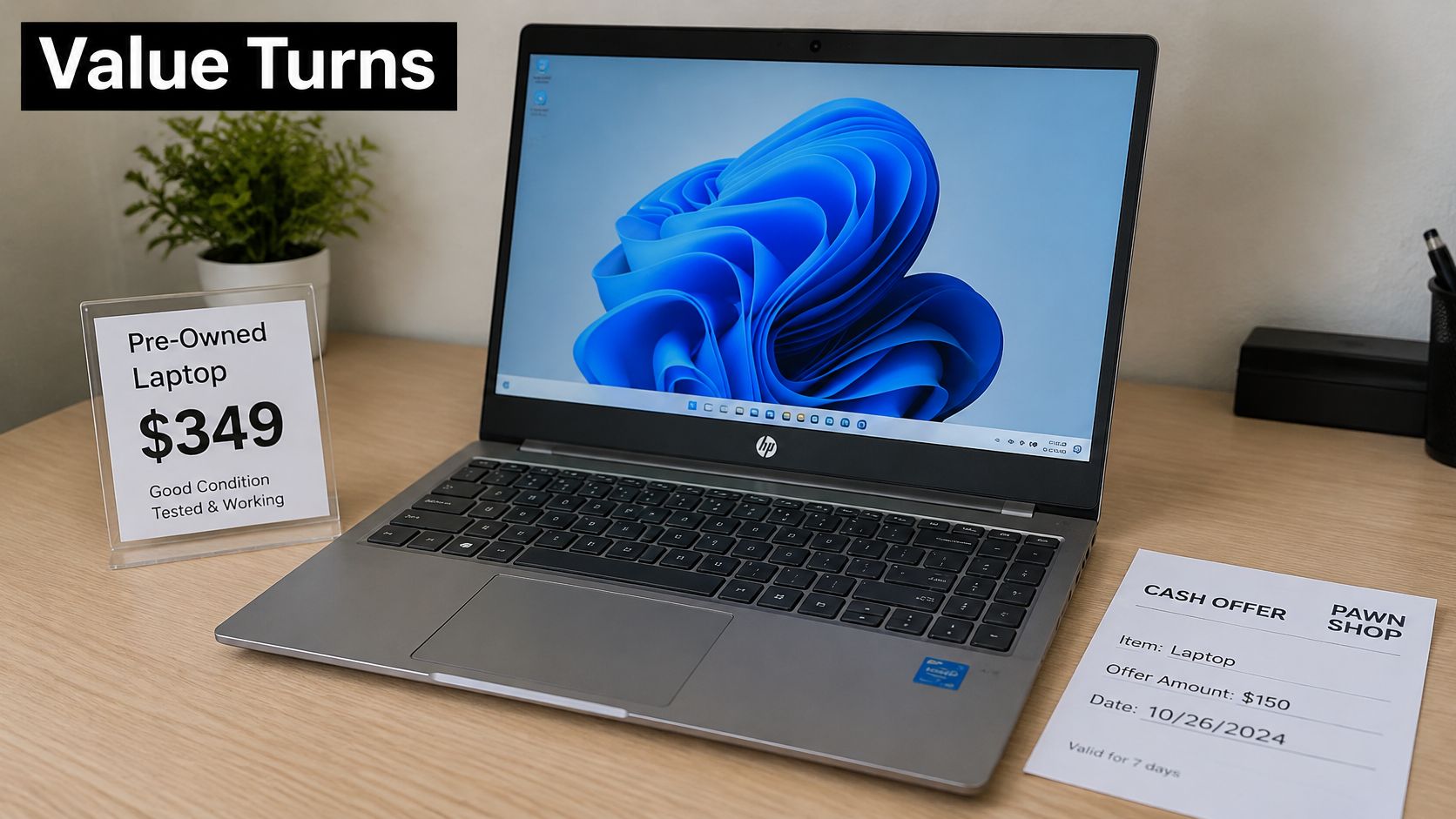
At our store, the loan amount is based on the item's wholesale, resale, or secondhand value, not its new price. We consider its current appraised value, present condition, and our ability to sell it. That means an original receipt can help document ownership without establishing the collateral value.
Why the loan falls below resale
The gap reflects cost and risk after intake. Authentication, hardware testing, possible repair, data wiping, storage, and time to find a buyer all reduce the advance. If the borrower does not repay, the shop must recover its advance through the item rather than through the original purchase receipt.
Consider two machines with similar purchase prices. One is a recognizable premium configuration with an intact screen and dependable battery. The other is an unusual configuration with uncertain replacement-part availability. Even if their owners paid similar amounts, a lender may judge the first machine easier to authenticate and resell.
The pattern is consistent across categories. Resale value drops first because age, wear, and newer models reset demand. The loan drops second because the advance must leave room for those resale costs. So the most expensive laptop is not automatically the best collateral. A familiar model in excellent condition can support a stronger relationship between appraised value and cash advanced than a pricier machine with uncertain demand.
> Judge the offer against the laptop's realistic value today, not against the amount you're still disappointed to have spent.
Use our pawn loan calculator to consider repayment alongside the proposed advance. A calculator can help you evaluate borrowing costs, but it cannot inspect the battery, identify a locked device, or replace the final appraisal.
Specs, Brand and Condition That Move the Offer
Factors that raise or lower a laptop pawn offer
| Factor | Raises the offer | Lowers the offer |
|---|---|---|
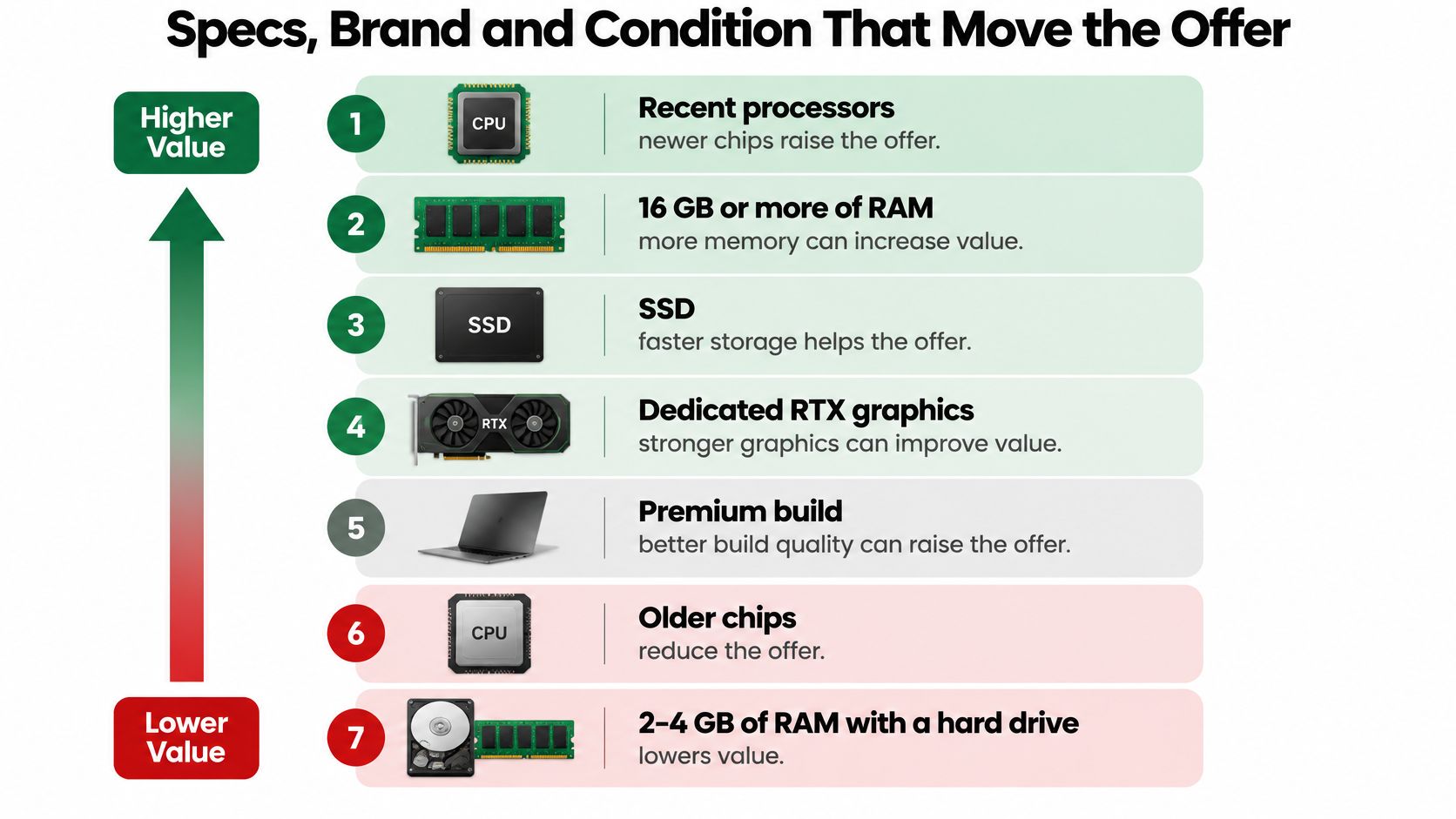
| Processor | Recent Intel or Apple Silicon chip | Older or low-end chip |
| Memory and storage | More RAM and an SSD | Limited RAM and a hard drive |
| Graphics | Recent dedicated RTX graphics | Integrated graphics only, particularly for gaming comparisons |
| Brand and build | MacBook or premium business model | Budget consumer model |
| Battery | Healthy runtime and reliable charging | Swollen or failing battery |
| Accessories | Original charger included | Charger missing |
| Screen | Clean, undamaged display | Cracks or dead pixels |
| Account status | Signed out, no activation lock | BIOS password or activation lock |
These factors matter because an appraiser isn't just checking whether a computer switches on. The appraiser is assessing what a subsequent buyer can use, what might need replacement, and whether the device can be transferred without access problems. A premium specification helps only when the hardware works and the owner can demonstrate control of the machine.
The hierarchy below summarizes the hardware features that strengthen or weaken that assessment.
Why premium models can hold their position
Swappa's used-electronics resale estimates place Apple Silicon MacBooks at roughly 40% to 60% value retention after three years, compared with approximately 25% to 40% for premium Dell, HP, and Lenovo business ultrabooks. These are category estimates, not guaranteed outcomes for every device bearing those brands.
The mechanism matters more than the logo. Buyers can more easily compare familiar configurations, assess expected software support, and recognize durable construction. When a lender can identify likely buyers and comparable devices, it has less uncertainty about eventual resale.
Budget laptops face a different problem. Buyers can compare them with inexpensive replacements, and abundant competing inventory can make an older machine harder to sell. A functioning budget laptop may still be useful to its owner while supporting only a modest collateral valuation.
Condition changes the meaning of the specifications
A dedicated graphics processor doesn't cancel out a cracked display. Likewise, a premium chassis doesn't make a failing battery irrelevant. Treat performance, physical condition, and account access as separate checks rather than assuming one strong feature compensates for everything else.
Our guide to clean, brand-name electronics and pawn offers provides context for presenting a device clearly. Cleanliness helps an appraiser inspect the laptop, but it doesn't repair worn hardware.
You can't change the processor generation before a visit. You can control whether the charger is present, the model details are accurate, and account restrictions have been resolved. Those preparations remove avoidable uncertainty without pretending the laptop is newer than it is.
Pre-Visit Checklist for Data, Locks and Paperwork
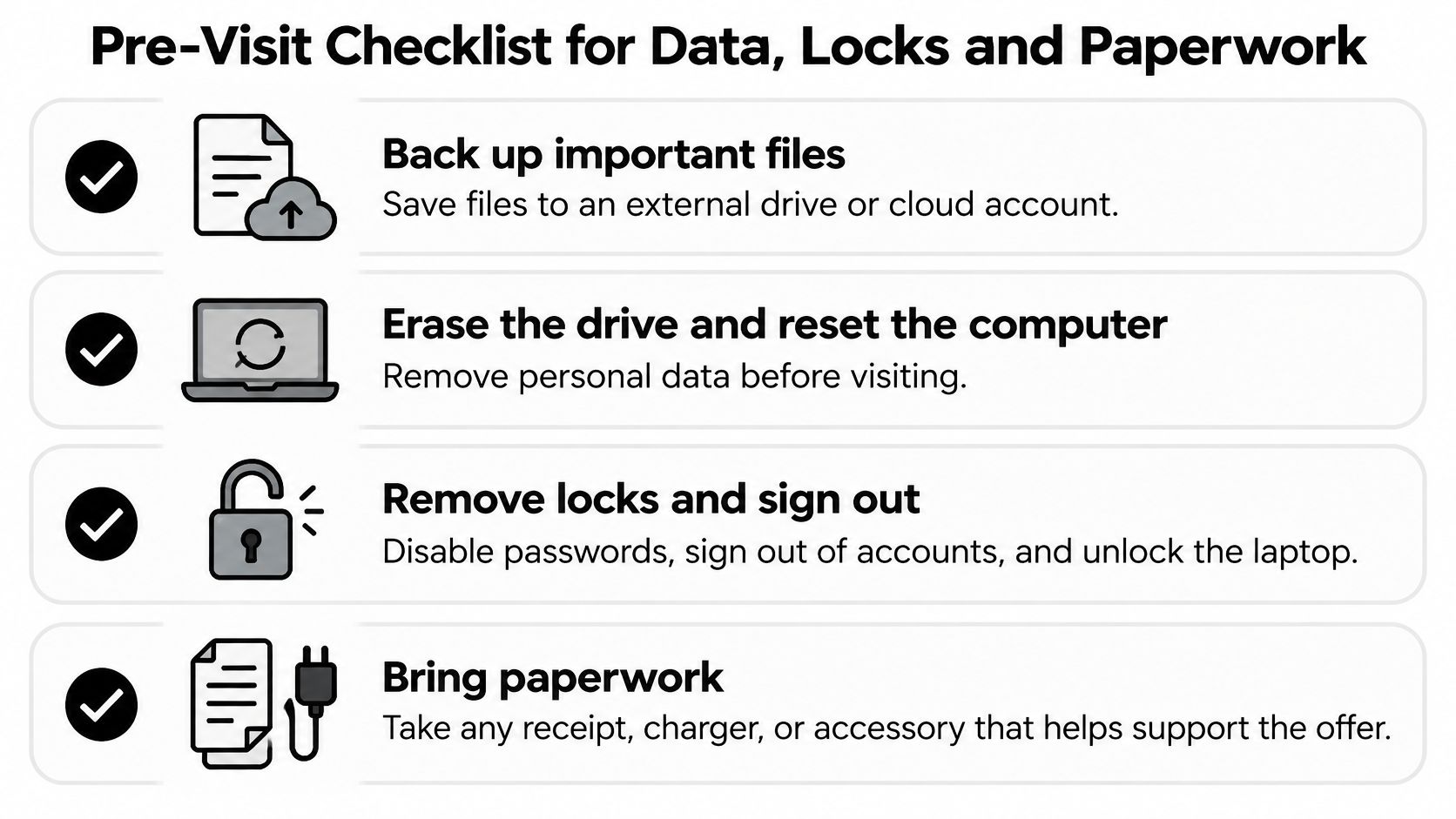
Protect your information before handing over the laptop. The Federal Trade Commission's computer-disposal guidance recommends backing up important files and erasing and resetting the computer before transferring it. Deleting files isn't enough because information may remain recoverable.
Prepare the laptop in a safe order
- Back up important files. Copy documents, photos, and other needed files to an external drive or a cloud account. Open some of the copied files from the backup destination to confirm they're accessible before erasing anything.
- Record the model and serial number. Photograph the device label and save the system information somewhere other than the laptop. Keep these records with your purchase documents so you can identify the exact machine after it leaves your possession.
- Sign out and remove transfer restrictions. Sign out of Apple ID or Microsoft accounts, disable Find My where applicable, and remove saved browser passwords. Clear any firmware or BIOS password you control, and don't assume a factory reset automatically removes activation locks.
- Erase the drive and reset the computer. Use the operating system's erase-and-reset process, selecting the appropriate option for transferring the device. For SSDs, use the device manufacturer's supported erasure procedure rather than assuming an overwrite utility intended for older hard drives is the right tool.
- Gather the charger and ownership records. Bring the receipt and original box if available, along with relevant accessories. Keep your own copies of purchase records rather than treating them as disposable clutter during the reset.
This checklist keeps the privacy and appraisal tasks together.
Confirm that the reset actually worked
After the reset, check that the laptop reaches its initial setup screen without demanding a previous owner's account. Don't recreate your personal profile just to demonstrate that the computer powers on. Ask how the appraiser will complete functional testing without reconnecting your private accounts.
An activation-locked MacBook or organization-managed business computer can have little usable collateral value until the authorized owner removes the restriction. If a former employer or school still manages the machine, contact that organization rather than trying to bypass its controls.
Our guide to finding pawn shops that buy electronics can help with visit preparation. Before handing over a data-bearing device, ask how the shop handles it and whether an incomplete reset changes acceptance or the offer. A stronger appraisal isn't worth exposing personal information.
Choosing the Right Route
Pawn loan compared with outright sale
| Criterion | Pawn loan | Outright sale |
|---|---|---|
| What you receive | Loan amount based on resale value | One-time payment |
| Keep the laptop? | You can reclaim it after repayment | No, the shop owns it after the sale |
| Repayment | Repayment required; our policy includes a 10-day grace period, and renewal is available | None |
| Unpaid outcome | We may sell it, offer a layaway term, or wholesale it | Not applicable |
| Evaluation | In-store test before the loan | In-store test before the offer |
| Best for | You want the laptop back and can repay | You want the cash and don't need the machine |
The grace period is not a substitute for confirming the loan's actual due date. At our store, you leave the item as collateral, and we review the transaction with you. Renewal is available, but you should understand the charges and payment requirements before relying on that option.
For an unpaid pawn, we may put the item up for sale, offer a layaway term, or wholesale it to a dealer. The outcome depends on the item and the customer's communication. Contacting the store is more useful than assuming the laptop will remain available indefinitely.
Decide based on whether you need the computer back
Choose the pawn route when the laptop remains important to you and you have a credible repayment plan. Include the practical cost of being without it: if it's your work or study computer, consider how you'll complete those tasks while the shop holds it.
An outright sale fits a different situation. Selling to us begins with an in-person evaluation, and you decide whether to accept the offer. If you've replaced the computer and don't need it back, compare the sale amount with the loan proposal rather than assuming either route automatically pays more.
> Decision test: Don't borrow against an essential laptop unless the repayment plan protects your ability to reclaim it.
If you're also comparing borrowing without collateral, Gerald Technologies, Inc.’s cash advance app is another resource to examine. Check eligibility, repayment timing, and applicable costs directly; don't assume an app-based advance and a pawn loan have interchangeable terms.
Before choosing, request the loan and sale offers for the same laptop on the same day. For the loan, confirm the due date, renewal rules, interest, and any charges in writing. For the sale, confirm the payment amount and that you're comfortable permanently transferring the machine.
Local Offers and Your Next Step
A resale estimate doesn't establish what every local counter will offer. Shops can differ in existing inventory, likely buyers, and willingness to hold a particular configuration. The same laptop may therefore receive different appraisals in Boise, Meridian, or Nampa without either shop using the original retail price incorrectly.
Before traveling, confirm which Idaho Pawn & Gold Exchange location is open and able to evaluate your laptop. Don't assume every location has identical availability or that an online estimate guarantees acceptance. Provide the exact model and describe any damage or account restrictions when discussing the visit.
Ask questions that explain the number
A useful appraisal should let you understand the offer, not just hear it. Ask practical questions that distinguish the machine's condition from the proposed transaction.
- Resale benchmark: What comparable model and configuration support the valuation?
- Testing assumptions: Does the offer assume the reset is complete and all hardware passes inspection?
- Missing components: How does an absent charger or an access restriction affect acceptance or value?
- Loan obligations: What are the due date, renewal requirements, interest, and total repayment amount?
- Unpaid collateral: How will the shop handle the item if repayment doesn't happen?
With us, the store team reviews the loan amount, costs, and due date with you. We return the pawned item after the loan amount and interest fees are paid. We don't charge pawn ticket fees or storage fees for laptops; the storage-fee exception concerns larger vehicles requiring off-site storage.
Turn the estimate into a decision
The strongest comparison isn't which shop quotes the largest advance. It's which proposal meets your cash need on terms you understand and, if you want the computer back, can realistically repay.
- Set a defensible expectation. Identify the matching configuration band and compare completed sales for the same model, processor generation, memory, and storage. Apply condition adjustments, but don't subtract age-related depreciation again if your comparison already uses the same model year.
- Make the machine ready to inspect. Complete the backup, account-release, and reset checklist. Charge the laptop and pack its charger so the appraiser can examine it without avoidable uncertainty.
- Review the written transaction. Check the advance, costs, due date, and renewal terms before signing. Compare local offers close together so changes in condition or timing don't undermine the comparison.
Bring the laptop, charger, serial number, and proof of ownership. Keep your expected range separate from your minimum cash need: needing a particular amount doesn't increase the collateral value. If the offer doesn't meet your needs or the repayment terms don't fit your budget, you can decline rather than forcing the transaction.
---
Idaho Pawn & Gold Exchange offers in-person laptop evaluations for customers considering a pawn loan or an outright sale. Bring your prepared laptop, charger, and ownership records to Idaho Pawn & Gold Exchange to discuss its current appraised value and review the proposed terms before deciding.