
You've got a laptop on the kitchen table, a bill coming due, and a search for “laptop pawn shop near me” open on your phone. You might want the computer back later. Or you might just want the unused machine out of the house and some cash in hand.
Before you pack it up, settle two things: what happens to your data, and what transaction you want. A promising phone quote won't help if the laptop is account-locked, the paperwork is missing, or the repayment terms don't fit your budget.
What to Bring to a Laptop Pawn Shop Visit
Staff need three answers at the counter: who you are, where the laptop came from, and whether you can sign in. Expect the final offer to depend on an inspection, not just the model name you give over the phone. Staff need to power it on, assess the battery and screen, and complete their ownership checks.
A receipt helps establish where the device came from, but it doesn't replace the shop's verification process. Likewise, a laptop that lights up isn't necessarily ready for resale.
| Item | Why the shop asks | What happens without it |
|---|---|---|
| Government-issued photo ID | Confirms identity before a loan or sale is written | The transaction can't be completed if required ID is missing |
| Proof of ownership, such as a receipt, order email or matching serial number | Supports ownership verification | The shop may need more evidence or decline the item |
| Original charger | Lets staff test power and battery operation | The offer may be lower, or testing may be refused |
| Original box and included accessories | Completeness supports resale value | Missing items may reduce the offer |
| Apple ID, Microsoft or Google sign-in details | Lets you clear activation or account locks | A locked device may be refused |
| Pawn ticket or loan paperwork | Identifies the loan when you redeem the laptop | Redemption may be delayed pending verification |
Bring a driver's license, state ID or passport, subject to the branch's requirements. Include the sleeve, docking station and other original accessories if you still have them. Keep ownership evidence accessible somewhere other than the laptop you're handing over.
Clear locks without sharing passwords
Enter account credentials yourself. Don't write passwords on the intake paperwork or leave them with staff. Clear an activation lock before signing out, following the preparation sequence below.
> Before leaving home: Call the branch and ask what it requires for laptops specifically. Requirements vary by shop and item.
Careful intake also supports responsible reuse. Small information-and-telecommunication equipment, including laptops, accounted for an estimated 5 billion kilograms of electronic waste in 2022, according to the Global E-waste Monitor 2024. Keeping a functioning machine usable is worth more consideration than a hurried price comparison.
Choosing a Pawn Loan, Outright Sale or Recycling
| Path | What you receive | Keep the laptop? | Main risk | Best when |
|---|---|---|---|---|
| Pawn loan | Cash loan based on resale value | You reclaim it if you meet the repayment terms | Fees and forfeiture if unpaid | You have a repayment plan and want it back |
| Outright sale | Final cash payment at the accepted offer | No | Accepting less than another buyer might offer, with no assumed buyback right | You want payment without further obligation |
| Certified recycling | No payment in this comparison | No | Giving up remaining resale value | Secure resale isn't economical |
Choose the outcome before comparing the money. A loan amount and a sale offer aren't interchangeable. One creates a repayment obligation if you want the laptop back. The other ends your ownership.
When a loan makes sense
A pawn loan fits a temporary cash gap when you have a realistic source of repayment. Name that source before signing. Hoping money will turn up isn't the same as knowing how you'll redeem the device.
Also consider how you'll manage without the laptop while the shop holds it. If it's your work or school machine, keeping the right to reclaim it doesn't solve the immediate problem of losing access. Use the pawn loan calculator as a planning aid, then confirm the actual fees, due date and total repayment amount in writing.
When selling or recycling fits better
Sell when you no longer need the machine and want a completed transaction. Don't assume the sale offer will be higher or lower than the loan amount. Ask for both and compare their consequences.
A specialist buyer is another route worth considering. For an example outside Idaho, Steel City IT provides information about laptop selling through a Sheffield workshop. It's an alternative to investigate, not a promise about what a local shop will pay.
Recycling fits obsolete or badly damaged equipment when repair and secure resale don't make economic sense. An account lock calls for legitimate recovery efforts first, not an attempt to bypass ownership controls. Ask a recycler how it handles storage and data before surrendering the device.
The FTC's computer-disposal guidance warns that computers can contain hazardous materials and directs consumers toward electronics-recycling options rather than ordinary disposal.
> The highest cash figure isn't automatically the best outcome. Compare what you receive, what you must repay, and what you permanently give up.
How to Prepare Your Laptop Before You Walk In
For a sale or recycling handoff, prepare the laptop as though you won't see it again. For a loan you intend to redeem, keep the backup and sign-out precautions, but ask the branch about storage, access and intake requirements before deciding whether to perform a full wipe.
Use this packing overview alongside the privacy steps below.
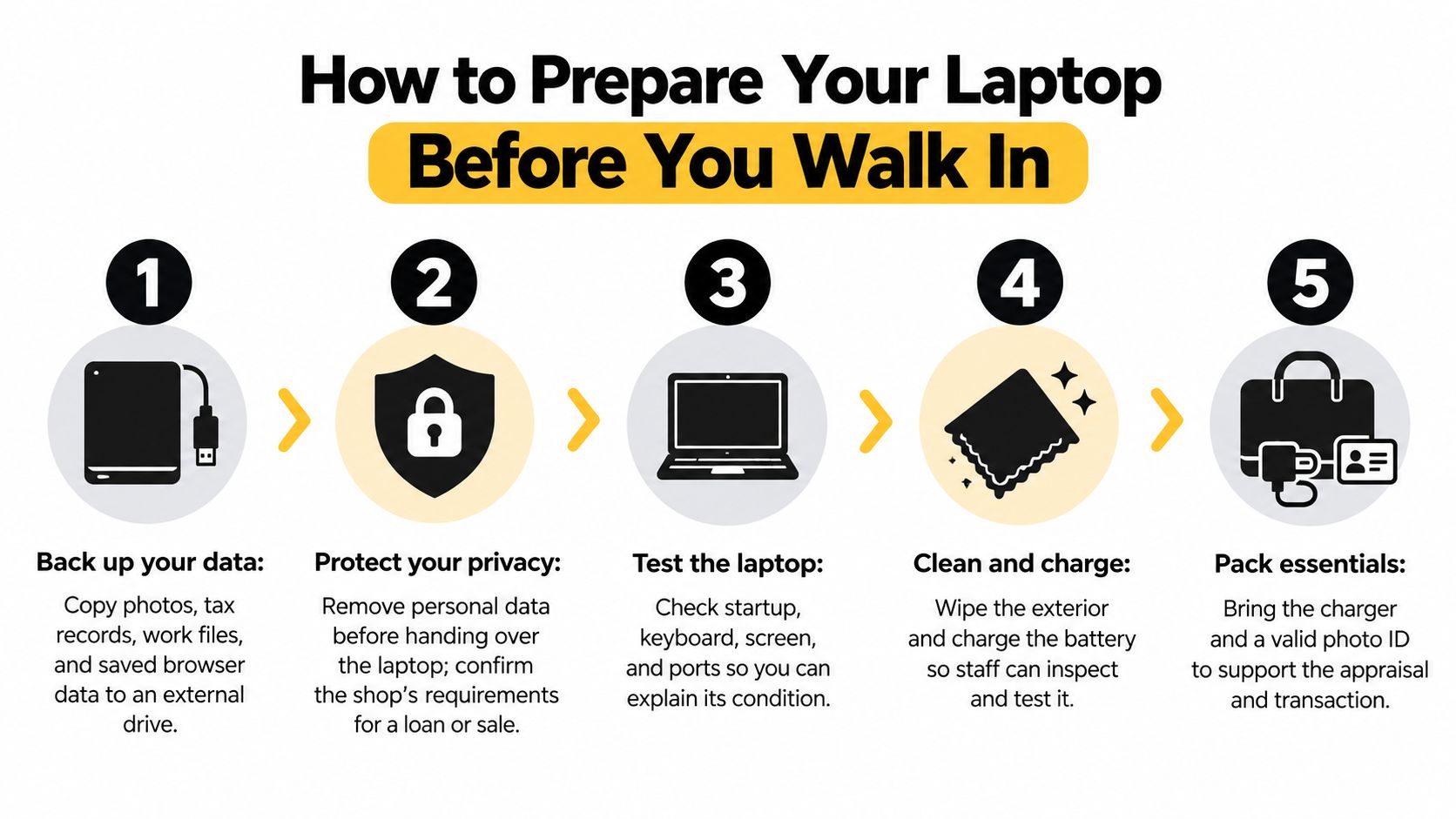
Follow the privacy sequence
- Back up your files. Copy photos, tax records, work documents and saved browser data to an external drive or trusted cloud account. Open the copies on another device. A backup you haven't checked is an assumption, not a confirmed recovery plan.
- Clear locks, deauthorize software and sign out. Remove applicable activation locks while you still have account access. Deauthorize paid software, such as Adobe applications or Microsoft Office where applicable, then sign out of Apple, Microsoft, Google and password-manager accounts. If an employer or school manages the laptop, have its administrator resolve management restrictions.
- Enable device encryption where available. Follow the manufacturer's instructions before resetting. Don't assume encryption was active just because the laptop required a login password.
- Use the supported erasure process. Follow the manufacturer's secure-erase instructions or the appropriate operating-system reset and drive-cleaning options. The FTC's information-protection guidance warns that ordinary deletion can leave information recoverable. Emptying the Recycle Bin isn't a substitute.
- Verify the result. Start the laptop again and confirm that it reaches the initial setup screen without exposing your previous accounts. Don't sign back into your personal account just to demonstrate that the screen works.
Check what a reset might miss
A factory reset isn't a universal sanitization guarantee. Encrypted SSDs, removable drives, cloud-synced information and firmware-managed storage can require separate checks. If the laptop held sensitive work or client records, follow the relevant organization's disposal requirements rather than improvising.
Before handoff, verify your photographs, browser credentials, work files, license keys and two-factor-authenticator recovery codes independently on another device. There's no credible universal success rate for wiping every laptop. The operating system, storage technology, encryption status and intake controls all matter.
For an additional preparation reference, review the video before beginning the handoff process.
Finish with the physical preparation: charge the battery, test the keyboard and ports, and pack the charger. For help removing debris without treating the keyboard roughly, consult Computer Daddy's keyboard cleaning guide. Cleaning supports inspection, but it doesn't replace the privacy work.
What Sets the Offer and How to Raise It
A clean lid doesn't tell staff whether a laptop can run supported software or whether a buyer will want that particular model. Usability, repair needs and demand matter alongside appearance. The purchase price explains what you paid, not what the shop can recover now.
The inspection should separate cosmetic wear from faults that affect use. Ask staff to explain which finding changed the offer.
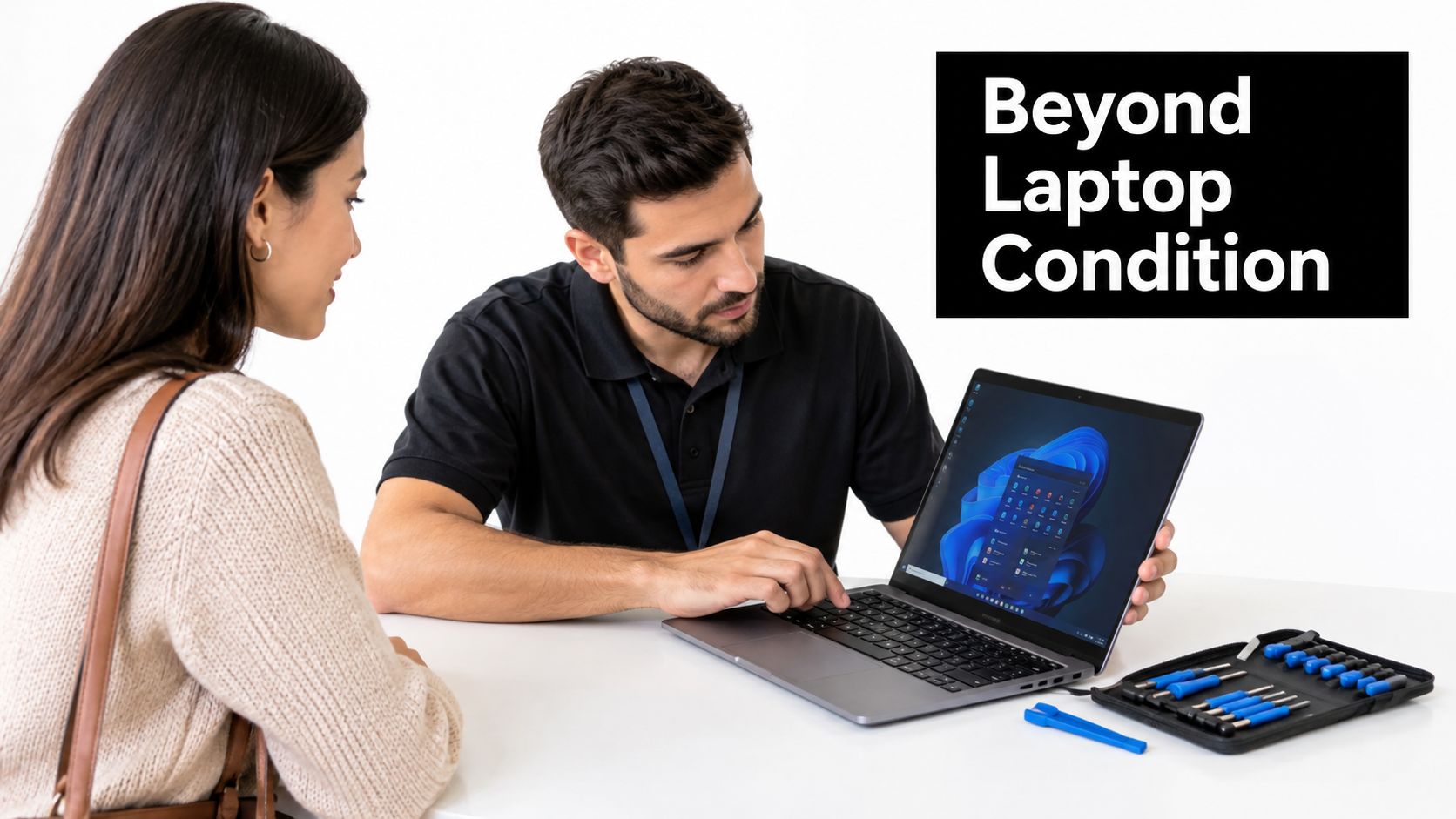
| Factor | What the shop checks | Effect on the offer |
|---|---|---|
| Processor generation and model | Whether the chip suits current software | Newer, in-demand configurations can support more value |
| Storage type and capacity | SSD or hard drive, plus capacity | An SSD and useful capacity can improve resale appeal |
| RAM | Installed memory | More usable memory can support a stronger offer |
| Battery health | Cycle count or wear report | A worn battery can lower the offer |
| Screen, keyboard and hinge | Dead pixels, sticking keys and hinge movement | Functional faults reduce value |
| Cosmetic wear | Dents, scratches, stickers and residue | Heavier wear can lower the condition grade |
| Operating-system support | Whether the system still receives updates | Unsupported systems can be harder to resell |
| Local demand for the model | Likely buyers and available resale channels | Stronger demand can support a better offer |
Understand the deductions
Battery condition matters because a buyer needs a usable portable computer, not just a machine that operates while plugged in. Screen and hinge damage also deserve attention. A repair can turn an otherwise attractive laptop into an uneconomic purchase.
Software support is a separate issue from whether the machine starts. A laptop may look excellent yet have limited appeal if its supported software options no longer suit likely buyers. Conversely, visible wear doesn't necessarily make an otherwise useful machine worthless.
A gaming laptop, business ultrabook and Chromebook serve different buyers. Give the exact model and configuration rather than describing everything as “a good laptop.” Staff need to assess the device you have, not the broader product family.
> At the counter: Ask whether a deduction reflects a repair, a missing accessory or limited demand. Each answer gives you a different decision to make.
A loan is generally set below the resale value the shop expects to recover. The sale offer answers a different business question, so request both figures rather than assuming they should match. A fault discovered during intake may change either offer even if you didn't know it existed.
Improve the presentation without overspending
- Document battery condition. On Windows, run
powercfg /batteryreportin Command Prompt. On a Mac, check the cycle count in System Information. Give staff the report without treating it as a guaranteed valuation. - Clean carefully. Use a microfiber cloth on appropriate surfaces and remove stickers gently. Don't damage a finish trying to make the laptop look unused.
- Keep the supported operating system. Avoid installing unfamiliar software just before inspection. A straightforward, supported setup is easier to evaluate.
- Skip speculative upgrades. Don't buy RAM or storage solely to chase a higher offer. Ask whether the shop would value the change before spending money you may not recover.
- Prepare a specification note. Record the model number, processor, RAM, storage and purchase year if known. Use the same description when requesting quotes from different shops.
- Disclose defects early. Mention charging trouble, intermittent keys or screen issues before inspection. Concealing a fault won't make the final evaluation more favorable.
For more on presentation, consult the shop's discussion of clean, brand-name electronic devices and pawn offers. Treat any phone estimate as provisional until staff inspect the laptop.
Questions to Ask Before Accepting a Loan
A counter offer isn't enough information to accept a loan. You need to know what getting your laptop back will cost and what happens if your plan changes. Read these questions aloud if that's easier than remembering them.
- Compare the offers. What is the loan amount, and how does it compare with the sale offer for the same laptop?
- Confirm the cost. What fees apply, what is the total repayment amount, and what is the exact due date?
- Check redemption. How do I redeem early, and what happens if I miss the date?
- Ask about custody. Who holds the laptop, and how is it stored between visits?
- Clarify privacy. What data-handling and wiping policy applies to an item I leave with you?
- Inspect the record. Will I receive a written ticket listing the serial number, condition and terms?
- Separate a sale. If I sell instead, is payment final, and does any return or cancellation policy apply?
- Protect your choice. Can I decline after inspection without a penalty?
- Understand verification. How do you verify my ID and proof of ownership?
Keep this financial checklist available while you review the paperwork.
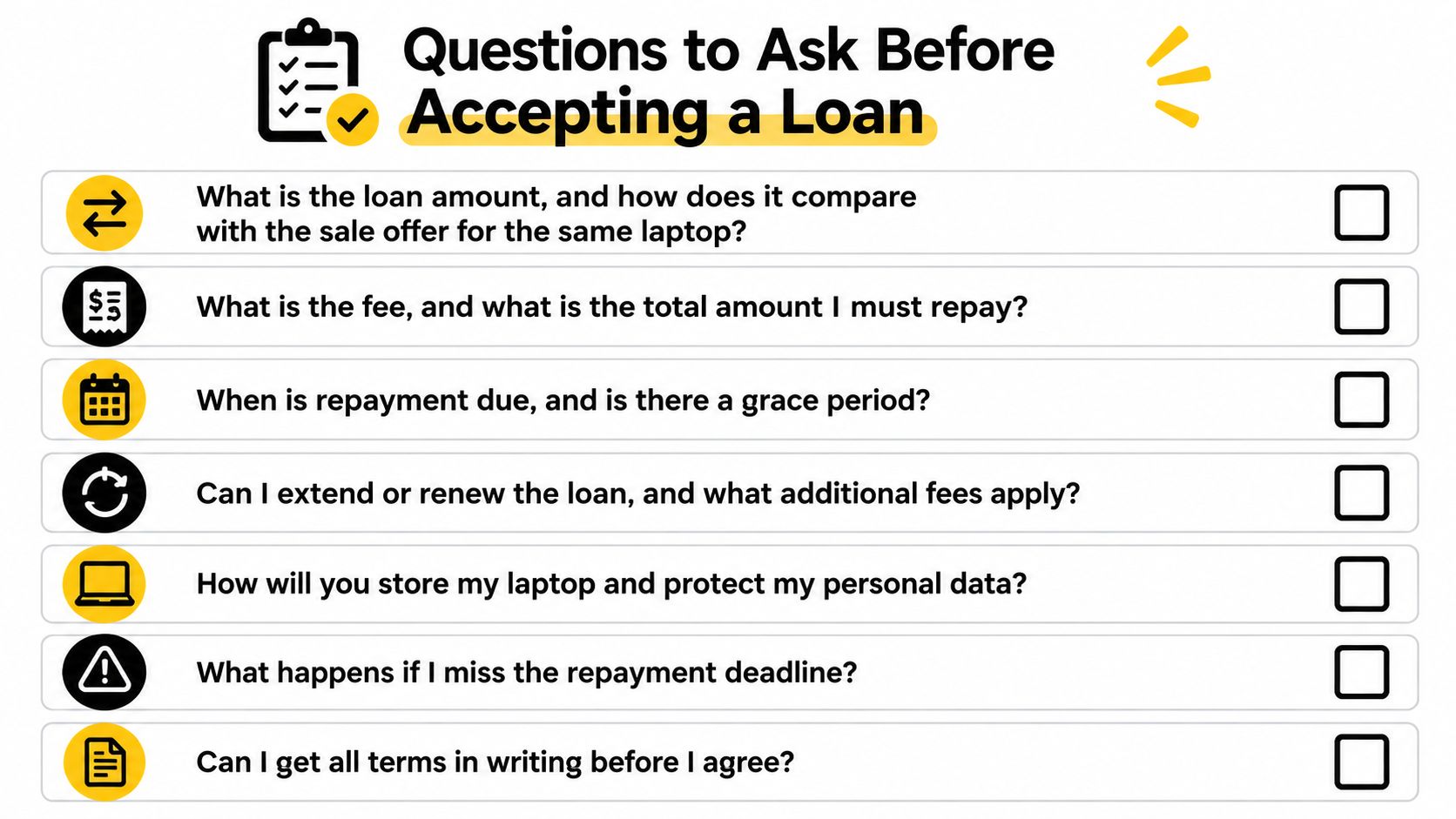
Recognize an incomplete answer
A clear answer should match the written ticket. “We'll work something out” isn't a repayment date, and “your data is safe” doesn't explain who can access the device.
Pause if staff can't explain fees, forfeiture or data handling in concrete terms. Ask for clarification before signing, and compare another shop if the answers remain vague.
Your Next Step at Idaho Pawn & Gold Exchange
For readers in Boise, Meridian and Nampa, the local option offers pawn loans and buys and sells electronics, jewelry, diamonds and luxury goods. Its stated approach emphasizes transparent, customer-focused service. Evaluate that approach through the written offer and the answers you receive, just as you would with any other shop.
Arrange the visit before leaving home
- Check current branch details. Use the company website for addresses, hours and policies. Take phone numbers and street addresses from the current listing rather than an old directory entry.
- Call your intended branch. Ask whether it's accepting your laptop model and what documentation it needs. Describe the condition accurately, including any lock or charging issue.
- Bring the prepared equipment. Pack the laptop, charger, photo ID and ownership evidence. Keep your specification note and verified backup separate from the machine.
- Request the appropriate offer. Review the pawn and sell options, then ask for the terms of the transaction you want. Don't let a loan discussion substitute for a sale quote if you don't intend to redeem.
- Compare before signing. Use the counter questions above and weigh the written offer against your other selling or recycling options.
You don't need to accept an offer just because you made the trip. Before handing over the laptop for inspection, establish whether any inspection charge or other obligation applies.
If the offer is lower than expected, you can decline before committing and take the laptop home. That's a useful outcome too: you've learned what this buyer will offer without surrendering ownership or leaving your personal information exposed.
---
Idaho Pawn & Gold Exchange offers pawn loans and buys and sells electronics, giving laptop owners a local place to compare borrowing with an outright sale. Visit Idaho Pawn & Gold Exchange to find your branch, confirm its laptop requirements, and arrange to bring your prepared device for an evaluation.